
If you don’t know where your traffic is coming from, you’re flying blind. In the world of digital marketing, success depends on more than just clicks and impressions—it’s about understanding why something works, where your users are coming from, and which touchpoints actually drive results.
That’s where UTM parameters come in.
Short for Urchin Tracking Modules, UTMs are small tags you can append to your URLs,often called UTM links or UTM URLs ,to pinpoint exactly how visitors are finding your site.
Whether you use a UTM builder to create them manually or an automated tracking tool, these tags unlock deep attribution insights. They help you make smarter campaign decisions and tie your marketing efforts to measurable outcomes like signups, feature adoption, or revenue.
In this guide, we’ll walk you through everything you need to know—what a UTM link is, how to create UTM links correctly, and which best practices help you scale clean, consistent tracking across your campaigns.
Whether you're just getting started or looking to streamline how your team handles attribution, this is the playbook you’ve been waiting for.
What Are UTM Parameters?
UTM parameters are tags added to the end of URLs that help analytics tools like Google Analytics, HubSpot, or Mixpanel track exactly where your traffic is coming from.
They answer key questions like:
- Which email campaign drove the most clicks?
- Which LinkedIn ad led to the most conversions?
- Which CTA button performed better on your landing page?
Example (Before and After)
Plain URL
CopyEdit
https://yourcompany.com/product
With UTM Parameters
CopyEdit
https://yourcompany.com/product?utm_source=linkedin&utm_medium=paid&utm_campaign=may_launch&utm_content=cta_banner
This version tells your analytics exactly where the user came from and why—without any guesswork.
Real Example: Newsletter Link Tracking
In a recent newsletter campaign, we used a UTM-tagged link in the banner logo at the top of the email:
CopyEdit
https://www.thrivestack.ai/?utm_source=newsletter&utm_medium=email&utm_campaign=issue1&utm_content=banner
Here’s what each tag means:
- utm_source=newsletter — The traffic came from our newsletter.
- utm_medium=email — The format was an email channel.
- utm_campaign=issue1 — This was the first issue of our ongoing series.
- utm_content=banner — The specific link was the logo banner (vs. other buttons in the email).
By structuring it this way, we can track not just email performance—but exactly which part of the email people clicked.
The 5 Core UTM Tags Explained
How to Build UTM Links (Step-by-Step)
Step 1: Start with Your Base URL
Example:
CopyEdit
https://yourcompany.com/signup
Step 2: Add UTM Tags
Be consistent with naming:
- Use lowercase
- Replace spaces with hyphens or underscores
- Keep it descriptive
Example:
CopyEdit
https://yourcompany.com/signup?utm_source=linkedin&utm_medium=paid&utm_campaign=may_launch&utm_content=cta_button
Common UTM Mistakes (and How to Avoid Them)
Tools to Build & Manage UTM Links

Whether you’re a solo marketer or a scaling growth team, these tools can save time and reduce errors:
UTM Builders
- Google Campaign URL Builder – Free, basic, fast
- UTM.io – Best for teams; includes templates, naming rules, and link governance
- CampaignTrackly – Bulk generation + CRM integrations
Real-World Impact: Connecting UTMs to Down-Funnel Metrics
A B2B SaaS company launched a multi-channel campaign: email, LinkedIn Ads, and Google Search.
Each campaign used structured UTM links. By integrating these with ThriveStack:
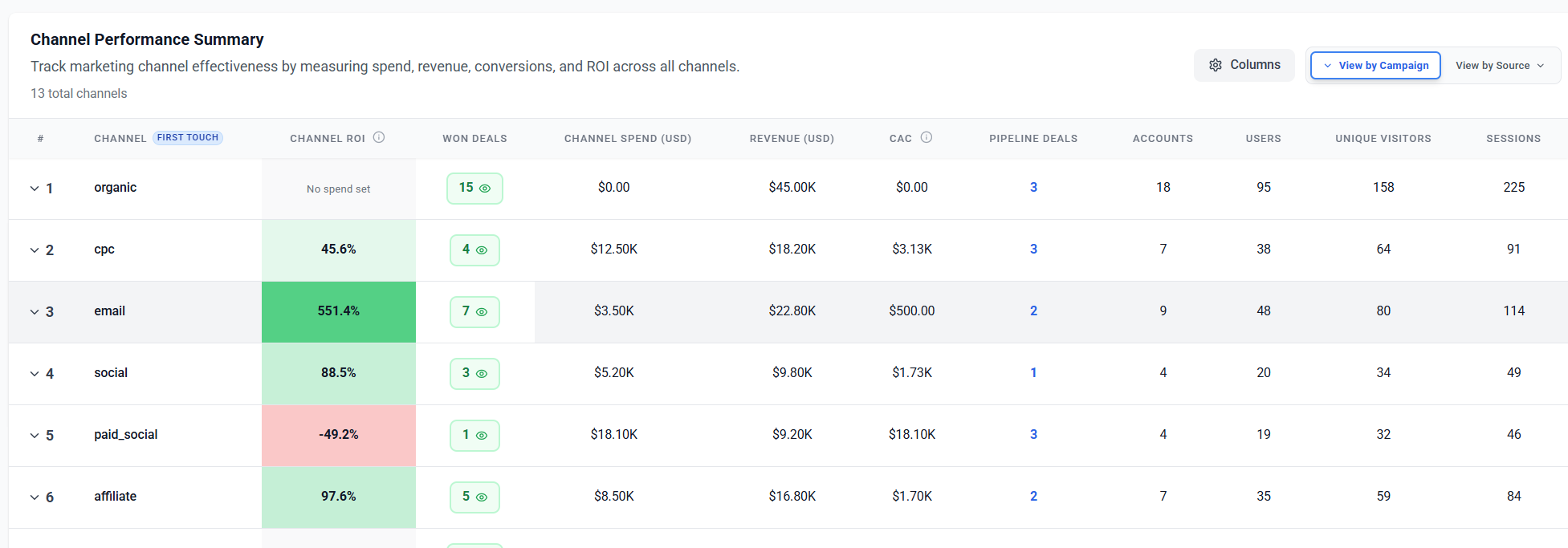
- They discovered that LinkedIn had fewer clicks but the highest free-to-paid conversion rate
- Google Ads brought more traffic, but lower activation
- Email links (like the one in our example) led to the fastest user activations
Result:
They reallocated the budget to LinkedIn and refined Google ad targeting—cutting CAC by 32% in 30 days.
UTM Best Practices (Used by Top SaaS Teams)
- Standardize Naming
Create a shared naming convention for your entire team. - Track Every Campaign
Use UTMs on all links—ads, emails, socials, even partner referrals. - Keep a UTM Repository
Use a spreadsheet or tool like UTM.io to manage link history and avoid duplicates. - Analyze Beyond Clicks
Use platforms like GA4, HubSpot, or ThriveStack to see downstream behavior—not just traffic.
Still missing data from your LinkedIn or email campaigns? Fix the UTM Source Blindspot and Boost SaaS Conversions by 35% to uncover hidden attribution gaps and improve your UTM tracking accuracy.
Conclusion
UTMs may be small additions to your links—but they have a massive impact on your marketing clarity.
They let you:
- Track exactly what’s working
- Improve campaign ROI
- Align teams with shared data
Want to connect your UTMs to revenue, retention, and activation?
ThriveStack lets you map campaign performance across the entire customer journey. Let’s talk.
Book a Demo or Start Free and unify your UTM tracking with end-to-end customer analytics.
FAQs
1.Can I use UTM parameters for email campaigns?
Yes, and you should. UTM tags in email links help track which emails, and even which specific buttons or banners, drive traffic and conversions—something that basic email analytics often can’t provide.
2. What’s the best way to organize my UTM links?
Create a central UTM repository using a spreadsheet or a tool like UTM.io. This avoids duplication, ensures naming consistency, and makes it easy to audit past campaigns.
3. Are UTM tags case sensitive?
Yes. For example, utm_source=Facebook and utm_source=facebook will show up as two separate sources in tools like Google Analytics. Always use lowercase to keep your reporting clean.
4. Do I need to add UTM parameters to every marketing link?
Ideally, yes. Any external link that brings users to your site—from ads to emails to partner posts—should be tagged so you can attribute performance properly.
5. Can UTM parameters negatively affect SEO?
Not if used correctly. UTMs should be used on campaign or paid links—not internal navigation or canonical URLs. Use them primarily for external campaigns where tracking matters.