Track with ThriveStack citedby:
AI bots, AI visits and revenue in one view
ThriveStack citedby tracks AI search from crawl to revenue. Connect a server log source for AI crawler and agent visits, GA4 or the ThriveStack script for human visits, Search Console for indexing and billing for revenue. The Attribution Overview then shows AI visits, bot activity and revenue side by side.
AI crawlers tracked from server logs, including GPTBot, ClaudeBot and PerplexityBot
ThriveStack docs, Nov 2026server log sources: Vercel, WordPress and a Cloudflare Worker
ThriveStack docs, Nov 2026how often the WordPress plugin sends AI crawler visits
ThriveStack docs, Nov 2026human visits, IP addresses or cookies stored from server logs
ThriveStack docs, Nov 2026What does ThriveStack citedby track for AI search?
Each source answers one question, and none of them sees everything alone. Read the table by row: the source, what it counts and where you see it in the product.
AI search tracking in ThriveStack citedby:
Five sources and where each one shows up
| Source | What it tracks | Where you see it |
|---|---|---|
| Server logs | AI crawler and agent visits per page, with the status code | Attribution, AI Crawl |
| GA4 or the ThriveStack script | AI-assisted human visits and channels | Attribution Overview |
| Google Search Console | Index status for every sitemap page | Content Audit |
| Billing, such as Stripe | Revenue joined to visits | Attribution Overview |
| Prompt runs | Mentions and citations per prompt and engine | Prompts |
How do you connect each source?
Server logs from Vercel
Go to Attribution, then Setup, then Vercel under Server logs. Click Connect with Vercel, approve ThriveStack Citedby in Vercel, tick the projects that serve your domain, then Connect Vercel. Verify, optionally with Send test bot traffic, and activate the AI Crawl Logs add-on. It needs Vercel Pro or Enterprise.
Server logs from WordPress
In Attribution, Setup, WordPress, download the plugin. In WordPress go to Plugins, Add New Plugin, Upload Plugin, then Activate. Back in ThriveStack, generate a connection code (it starts with tswp1. and is shown once), paste it in Settings, AI Crawler Tracker, then Save and Test connection. It needs WordPress 5.6 or later and PHP 7.4 or later.
Server logs from a Cloudflare Worker
If Cloudflare proxies your domain, use the Cloudflare Worker, because it sees cached hits too. Only one server log source can be active per domain.
Human visits
Connect Google Analytics in Attribution, Setup, or install the ThriveStack marketing script on your site for first-party visits and channels. GA4 is the only source of human visits; logs never store them.
Revenue
Connect billing, such as Stripe with a read-only restricted key, so revenue joins the visits.
How do you read the Attribution Overview?
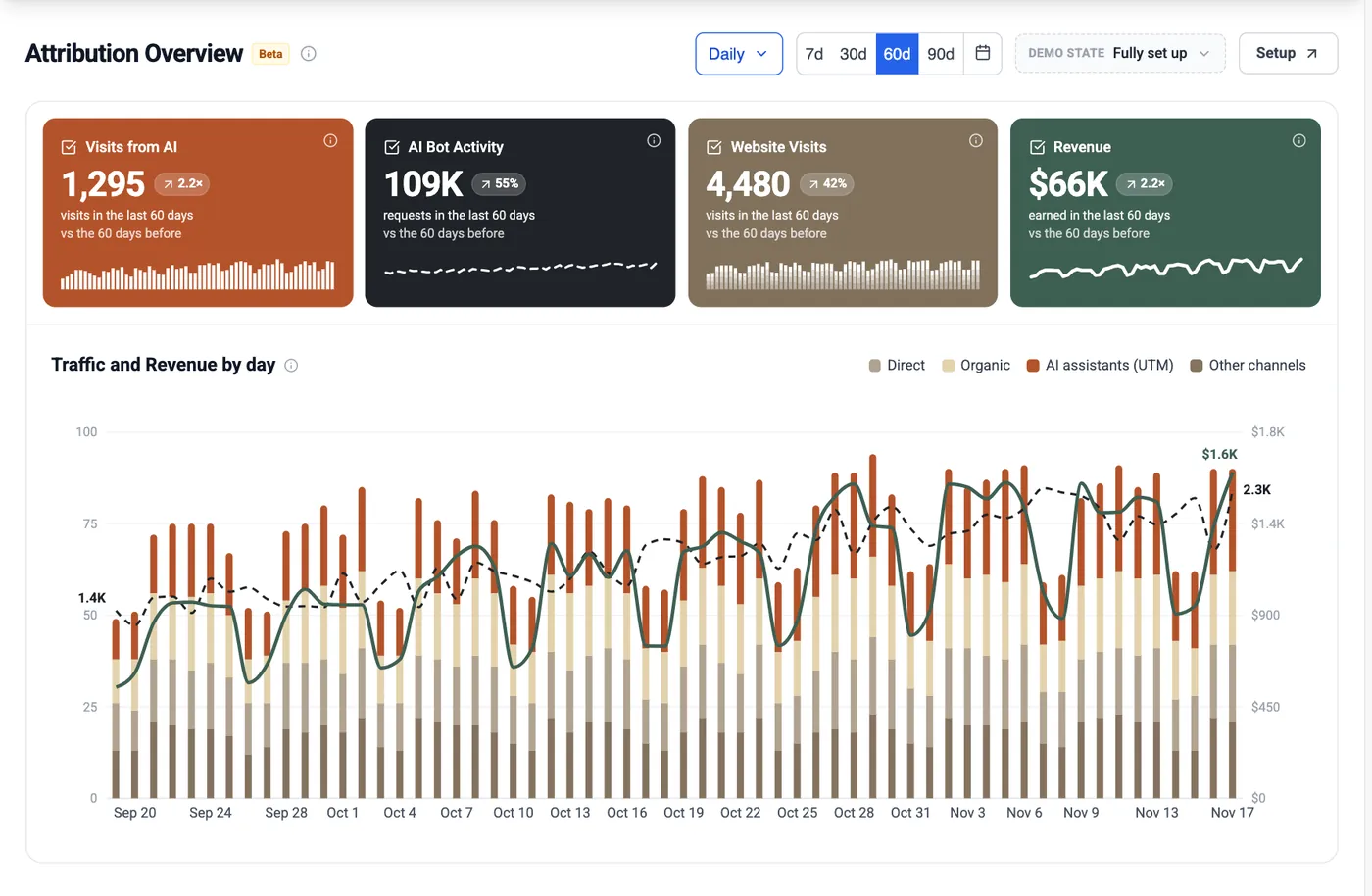
The Attribution Overview puts AI visits, AI bot activity, all website visits and revenue side by side, then charts traffic and revenue by day. A good sign is AI visits and revenue rising together. A warning sign is rising bot activity with flat AI visits, which points back to crawled but uncited pages.
 1234
- 11,295 visits from AI in 60 days, up 2.2 times.
- 2109K AI bot requests from server logs.
- 3$66K revenue, joined from billing.
- 4Setup: connect logs, analytics and revenue in one place.
Research for this lesson.
Our own studies behind this lesson. Each one has the key charts and numbers, and a link to the full article.
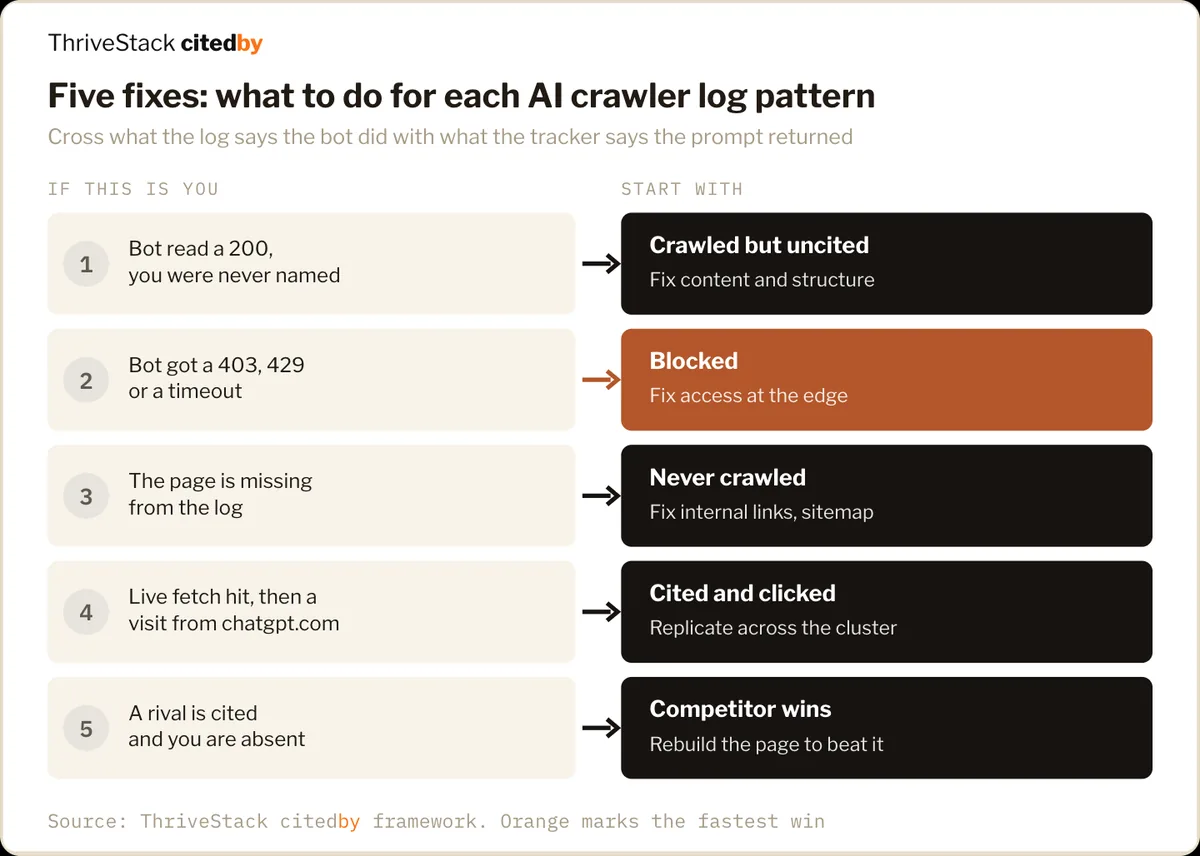
ThriveStack citedby connects your server logs, GA4, Search Console and billing, so AI bots, AI visits and revenue sit in one view.
Track with ThriveStack citedby, answered.
Does ThriveStack citedby store human visits from server logs?
No. Server log sources keep AI crawler requests only: path, host, method, status, user agent, referrer and time. Human visits, Googlebot, Bingbot, IP addresses and cookies are never stored.
Which server log source should I use?
Use the Cloudflare Worker if Cloudflare proxies your domain. Otherwise use Vercel or the WordPress plugin, whichever serves your site. Only one can be active per domain.
Sources for this lesson
- ThriveStack docs: AI Crawl Attribution with Vercel Our own product docs
- ThriveStack docs: AI Crawl Attribution with WordPress Our own product docs
- ThriveStack docs: MCP tools reference Our own product docs
Figures were checked against each page on Nov 17, 2026. Vendor studies are labelled as vendor claims.